Ground Truth
Ground Truth app icon

Wi-Fi and internet, diagnosed

Ground Truth finds out why your Wi-Fi or internet feels slow, room by room and over days, before you buy a new router you may not need. When the problem is your provider, it helps you prove it.

Coming soon. Get one email when Ground Truth launches, and nothing else.

  • iPhone
  • iPad
  • Mac
  • Free fixes first
  • Hardware only when it helps
  • No account, stays on your devices
  • Status in words, not just color

What it does

What it does

Ground Truth: Room by room Wi-Fi map

Room by room Wi-Fi map

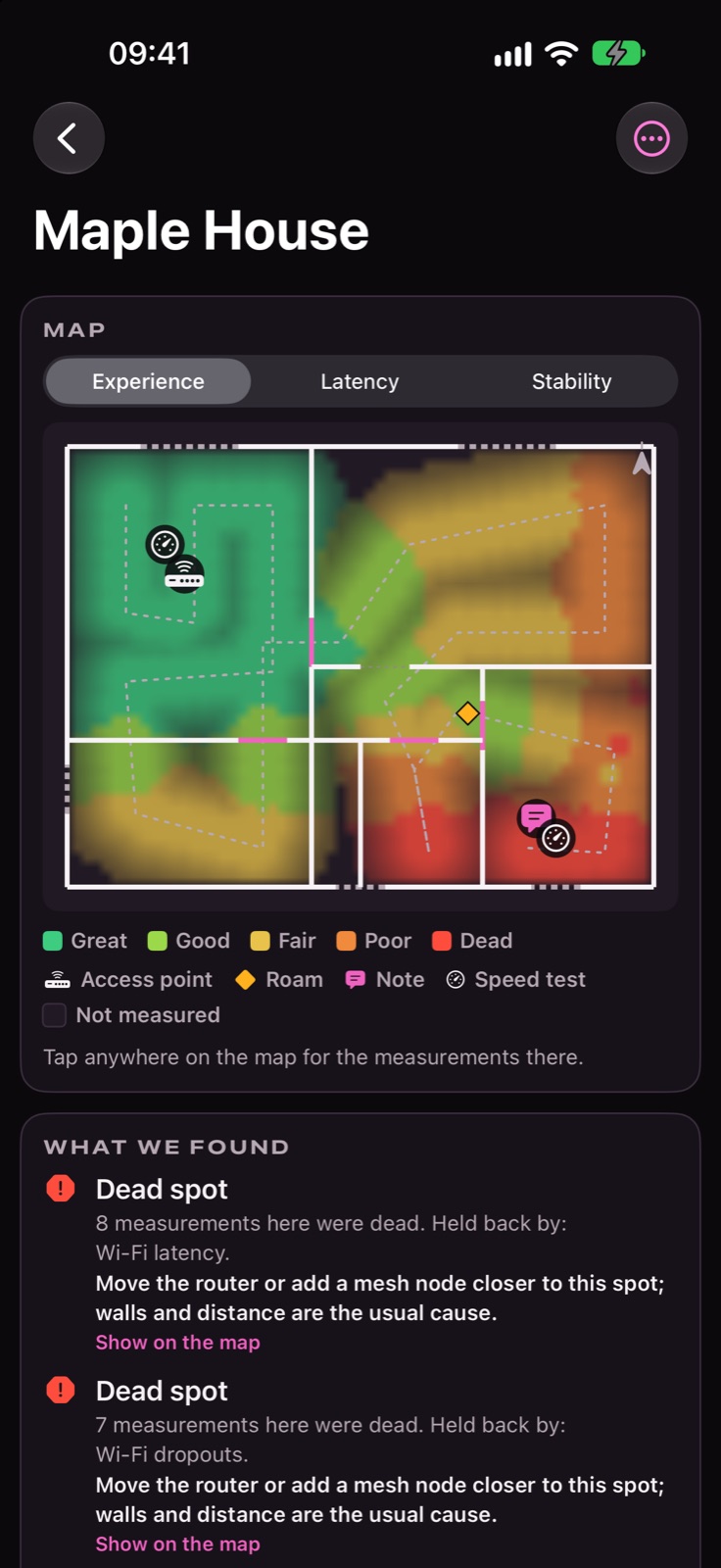
See where your Wi-Fi is great, poor or dead, drawn on your own floor plan and stopped at the walls.

Ground Truth: Live connection grades

Live connection grades

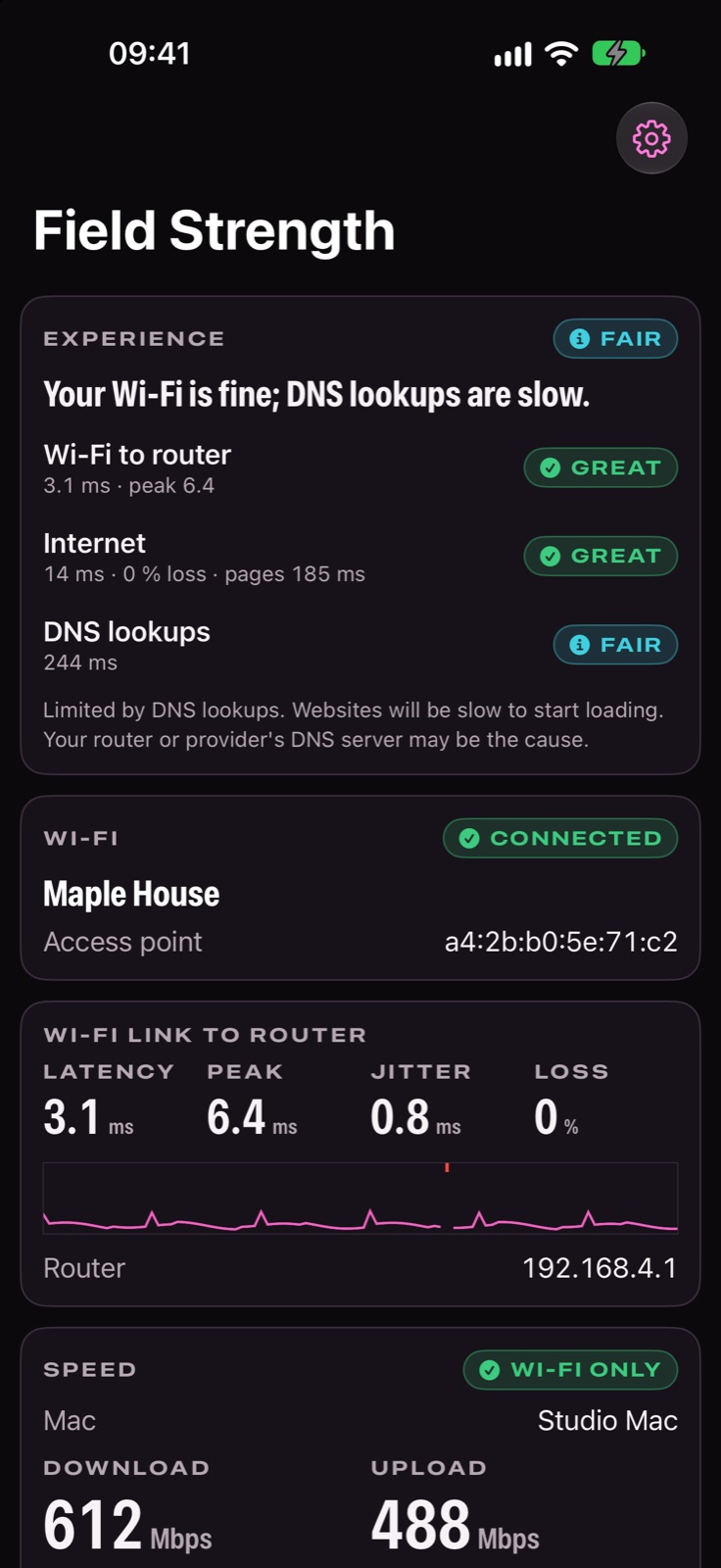
Wi-Fi to the router, the internet, DNS and web pages, each graded on its own so you see which part is slow.

Features

Find the real cause before you buy hardware

63 things Ground Truth does, grouped by what you're trying to do.

Map your home

17 features
  • Latency and stability layers

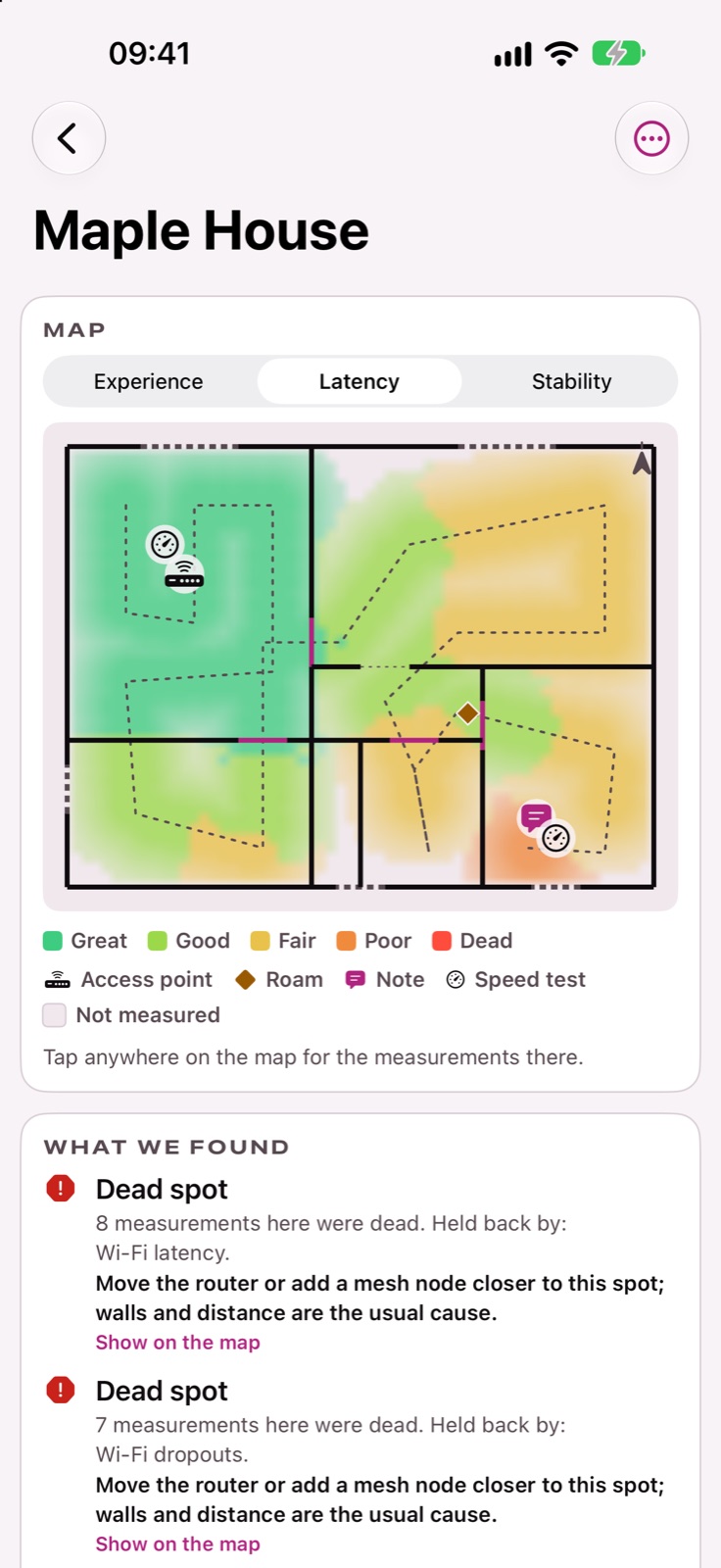
    Switch the map to delay or steadiness to find the rooms where calls stutter even when the signal looks fine.

    Pro
  • Scan your floor plan

    Walk each room holding your iPhone or iPad. The LiDAR scanner draws the floor plan while Ground Truth measures your Wi-Fi.

  • Survey without LiDAR

    No LiDAR, or measuring a yard or garage? Walk and measure anyway, then place it on a plan.

  • Use your own floor plan

  • Ready for calls, games and 4K

    More with Pro
  • Plain-language findings

  • Every floor and every home

    More with Pro
  • Before and afterPro
  • Grades on your floor in ARPro
  • Signal strength from your MacPro
  • Indoor cellular mapPro
  • Access points and photo notes
  • Speed tests as you walk
  • Notices when you change floors
  • 3D model of your homePro
  • Edit the plan
  • Outages stay off the map
What these do
Use your own floor plan
Bring in a PDF or photo of your plan, set its scale, and tap where you measured.
Ready for calls, games and 4K
Each room is checked for video calls, gaming, 4K streaming and browsing, with a summary like "Calls work in 8 of 10 rooms".
Plain-language findings
Dead spots, weak rooms and what to do about them, including where a mesh node would actually help.
Every floor and every home
Keep separate maps for each floor and each place you look after.
Before and after
Put two surveys side by side to see whether a change actually helped.
Grades on your floor in AR
Walk back through the house and see each spot's grade on the real floor.
Signal strength from your Mac
Carry a Mac through the house to add signal, noise and link rate readings to the map.
Indoor cellular map
See where your phone signal holds up inside, and where Wi-Fi Calling would help.
Access points and photo notes
Mark where your router and access points are, and pin photos and notes to a spot.
Speed tests as you walk
Stand still for a moment and a quick speed test is recorded at that spot.
Notices when you change floors
Going up the stairs mid-walk? Ground Truth notices and asks which floor you're on.
3D model of your home
Open the scanned rooms as a 3D model.
Edit the plan
Fix a wall the scan got wrong, or remove one.
Outages stay off the map
A provider outage or a network switch during a walk shows on the timeline instead of painting a room as bad.

Find the real cause

10 features
  • Finds the real cause

    Your Wi-Fi, router, modem, provider and DNS are tested on their own, so the problem gets the right name and a confidence level.

  • Free fixes first

    Before anything costs money: moving the router, changing a channel or DNS, a cable, a setting. Check them off as you go.

  • Hardware only when it helps

  • Did it work?

  • Network checks

  • Lag under load

  • What you might be thinking
  • What's been ruled out
  • Responsiveness score
  • NAT and gaming check
What these do
Hardware only when it helps
A new router, modem or mesh is only suggested when a measurement shows it would help, with a rough price and no brands.
Did it work?
Mark a fix done and Ground Truth measures again, then shows before and after.
Network checks
Double NAT, broken IPv6, a slow router DNS, DNS hijacking, blocked HTTP/3 and packet-size problems, checked in one go.
Lag under load
Measures how much delay grows when someone streams or downloads, in each direction, graded A+ to F.
What you might be thinking
Common guesses, like needing mesh or a new router, set against what the measurements actually say.
What's been ruled out
See which parts of your connection were checked and found fine, and why.
Responsiveness score
How responsive your connection stays when it's busy, in round trips per minute.
NAT and gaming check
Shows whether your connection is Open, Moderate or Strict for games and calls, and spots carrier-grade and double NAT.

Measure your connection

9 features
  • Internet speed test

    Download and upload speed with no extra hardware, with a note that it includes your provider's line.

  • Wi-Fi-only speed test

    Pair a Mac on your network to measure your Wi-Fi alone, separate from your internet plan.

    Pro
  • Video call checkPro
  • Knows when you switch networks
  • Calm, readable numbers
  • Small-packet capacityPro
  • Drops and IP changes logged
  • Signal, noise and channel on Mac
  • Nearby networks
What these do
Video call check
Simulates a video call through your Mac and scores how it would sound, idle and with the line busy.
Knows when you switch networks
Changing networks, joining cellular or turning on a VPN is noted, never reported as a problem.
Calm, readable numbers
Readings settle over half a minute and round sensibly, so grades don't flicker on every ping.
Small-packet capacity
Tests how many small packets your Wi-Fi handles, the kind games and calls send.
Drops and IP changes logged
Wi-Fi drops, address changes, lost internet and sign-in pages are noted with the time.
Signal, noise and channel on Mac
Your Mac shows live signal strength, noise, channel and link rate.
Nearby networks
See the networks around you and how crowded each channel is.

Cellular on your iPhone

3 features
  • Test cellular too

    Your iPhone runs the same checks over cellular while staying on Wi-Fi, so you can compare them. Off until you turn it on.

  • Is it your provider?

    When the home internet is down but cellular works, Ground Truth says so plainly.

  • Capped cellular speed tests
What these do
Capped cellular speed tests
Optional speed tests over cellular, with a monthly data limit you set.

Watch it over time on your Mac

10 features
  • Watches your connection for days

    Leave Ground Truth running on a Mac and it records every dropout and slowdown, even with the window closed.

  • Outage log

    Each outage with its start, end and which part of the path failed first.

  • Spots router restarts
  • Evening slowdown charts
  • Reads your cable modem
  • Wired or Wi-Fi, and link speed
  • Respects your data cap
  • Menu bar status
  • Your Mac as a test partner
  • Your plan and label speeds
What these do
Spots router restarts
Restarts are logged as outages and marked as likely restarts, with a note when the timing suggests an automatic update.
Evening slowdown charts
See when your connection struggles by hour and day of the week.
Reads your cable modem
Signal levels, errors and restarts from common cable modems and gateways, compared with the normal ranges.
Wired or Wi-Fi, and link speed
Knows how the Mac is connected and flags an Ethernet link slower than your plan.
Respects your data cap
Scheduled tests stay within a share of your monthly allowance that you set.
Menu bar status
A glance at your connection from the menu bar.
Your Mac as a test partner
Your Mac pairs with your iPhone by a 6-digit code to run Wi-Fi-only speed and call tests.
Your plan and label speeds
Enter your plan and its broadband label to see how often you get less than promised.

Get your provider to fix it

7 features
  • Make your case to your provider

    Gathers the evidence, writes the message and tracks every contact until the problem is fixed.

  • Messages written for you

    A chat opener, a full email and a phone script, filled in from your measurements. Copy or share in one tap.

  • Know the next step
  • Evidence pack
  • Follow-up reminders
  • Outage credit estimate
  • Did the visit fix it?
What these do
Know the next step
When to follow up, when to escalate in writing, and how to reach the FCC, CCTS or the UK ombudsman.
Evidence pack
A PDF of outages and modem readings, plus a spreadsheet of outages, ready to attach.
Follow-up reminders
A reminder when it's time to chase your provider again.
Outage credit estimate
Adds up outage hours so you can ask for a credit.
Did the visit fix it?
Record what the technician did and compare the evidence before and after.

Reports and sharing

3 features
  • PDF survey report

    A report with the map, every room's grades and the findings.

    Pro
  • CSV exportPro
  • Share a survey
What these do
CSV export
Every measurement as a spreadsheet.
Share a survey
Send a survey to another device with AirDrop, Files or Mail.

Comfort and privacy

4 features
  • Status in words, not just color

    Every grade carries a word and a symbol, decorative art is hidden from VoiceOver, and motion respects Reduce Motion.

  • No account, stays on your devices

    No sign-in. Surveys and provider cases stay on your devices; location is removed from shared surveys and account numbers never leave the device.

  • Night red
  • Made for iPad and Mac
What these do
Night red
A dim all-red look for dark rooms.
Made for iPad and Mac
Side-by-side layouts on larger screens.

Everywhere you are

One app, on every screen you use

What each device adds.

  • iPhone

    iOS 26.1

    • Test cellular too
    • Is it your provider?
    • Indoor cellular map
    • Capped cellular speed tests
  • iPad

    iPadOS 26.1

    • Scan your floor plan
    • Survey without LiDAR
    • Grades on your floor in AR
    • Wi-Fi-only speed test
  • Mac

    macOS 26

    • Watches your connection for days
    • Outage log
    • Spots router restarts
    • Evening slowdown charts

No account, stays on your devices

No sign-in. Surveys and provider cases stay on your devices; location is removed from shared surveys and account numbers never leave the device.

Pricing

Diagnosis is free

Free: one home and floor, the survey walk and Wi-Fi map, the diagnosis, network checks, the Mac monitor and the provider case. Ground Truth Pro adds more homes and floors, every map layer, Wi-Fi-only tests with your Mac, PDF and CSV reports, before and after, 3D and AR: $2.99 a month, $19.99 a year with a 7-day free trial, or $49.99 once. Family Sharing included.

Free

Map one home, find the cause, watch it from your Mac.

  • Room by room Wi-Fi map
  • Finds the real cause
  • Live connection grades
  • Watches your connection for days
  • Make your case to your provider
What each plan includes
FeatureFreePro
Ready for calls, games and 4KPer-room summary and the check at each spotAdds the Ready map layer
Every floor and every homeOne home and one floorEvery home and every floor
Latency and stability layersNot includedIncluded
Before and afterNot includedIncluded
Grades on your floor in ARNot includedIncluded
Wi-Fi-only speed testNot includedIncluded
Video call checkNot includedIncluded
PDF survey reportNot includedIncluded
Signal strength from your MacNot includedIncluded
Indoor cellular mapNot includedIncluded
3D model of your homeNot includedIncluded
Small-packet capacityNot includedIncluded

iPhone or iPad with iOS 26.1 or later, Mac with macOS 26 or later. Scanning a floor plan needs an iPhone or iPad with LiDAR; everything else works without it.

Questions

Before you download

How much does it cost?

Free: one home and floor, the survey walk and Wi-Fi map, the diagnosis, network checks, the Mac monitor and the provider case. Ground Truth Pro adds more homes and floors, every map layer, Wi-Fi-only tests with your Mac, PDF and CSV reports, before and after, 3D and AR: $2.99 a month, $19.99 a year with a 7-day free trial, or $49.99 once. Family Sharing included.

Which devices does it run on?

iPhone (iOS 26.1 or later), iPad (iPadOS 26.1 or later), Mac (macOS 26 or later).

What do I need?

iPhone or iPad with iOS 26.1 or later, Mac with macOS 26 or later. Scanning a floor plan needs an iPhone or iPad with LiDAR; everything else works without it.

What happens to my data?

No sign-in. Surveys and provider cases stay on your devices; location is removed from shared surveys and account numbers never leave the device.

Something else? Ask us.

Ground Truth

Wi-Fi and internet, diagnosed

Coming soon. Get one email when Ground Truth launches, and nothing else.